> ## Documentation Index
> Fetch the complete documentation index at: https://resend.com/docs/llms.txt
> Use this file to discover all available pages before exploring further.
# Claiming a domain
> Claim a domain that is already verified by another team.
A domain can only be active on one Resend team at a time. When you try to add a domain that has already been verified by another team, Resend will alert you that the domain is already in use.
* **If you own the team where the domain is registered**, delete the domain so you can add it in your desired team.
* **If you do not have access to the team where the domain is registered**, you can prove ownership and [claim the domain](#claim-a-domain) by adding a TXT record to your DNS and then verifying the claim.
## Why This Happens
Common reasons a domain you own may already be registered:
* A team member or contractor added it to a separate Resend team.
* You are logged into a different Resend team than the one where the domain was originally added.
Before claiming a domain, check with your team members or in your other teams to see if you can locate the verified domain and [transfer it between teams](/docs/dashboard/domains/manage-domains#transfer-a-domain-between-teams) instead.
## Claim a domain
Claim a domain by adding a TXT record to your DNS, or do it in one click via DomainConnect for supported registrars.
This record is provided along with the alert in your Dashboard, or when you [use the Domains API](#using-the-domains-API) and call the [**Claim Domain** API endpoint](/docs/api-reference/domains/claim-domain).
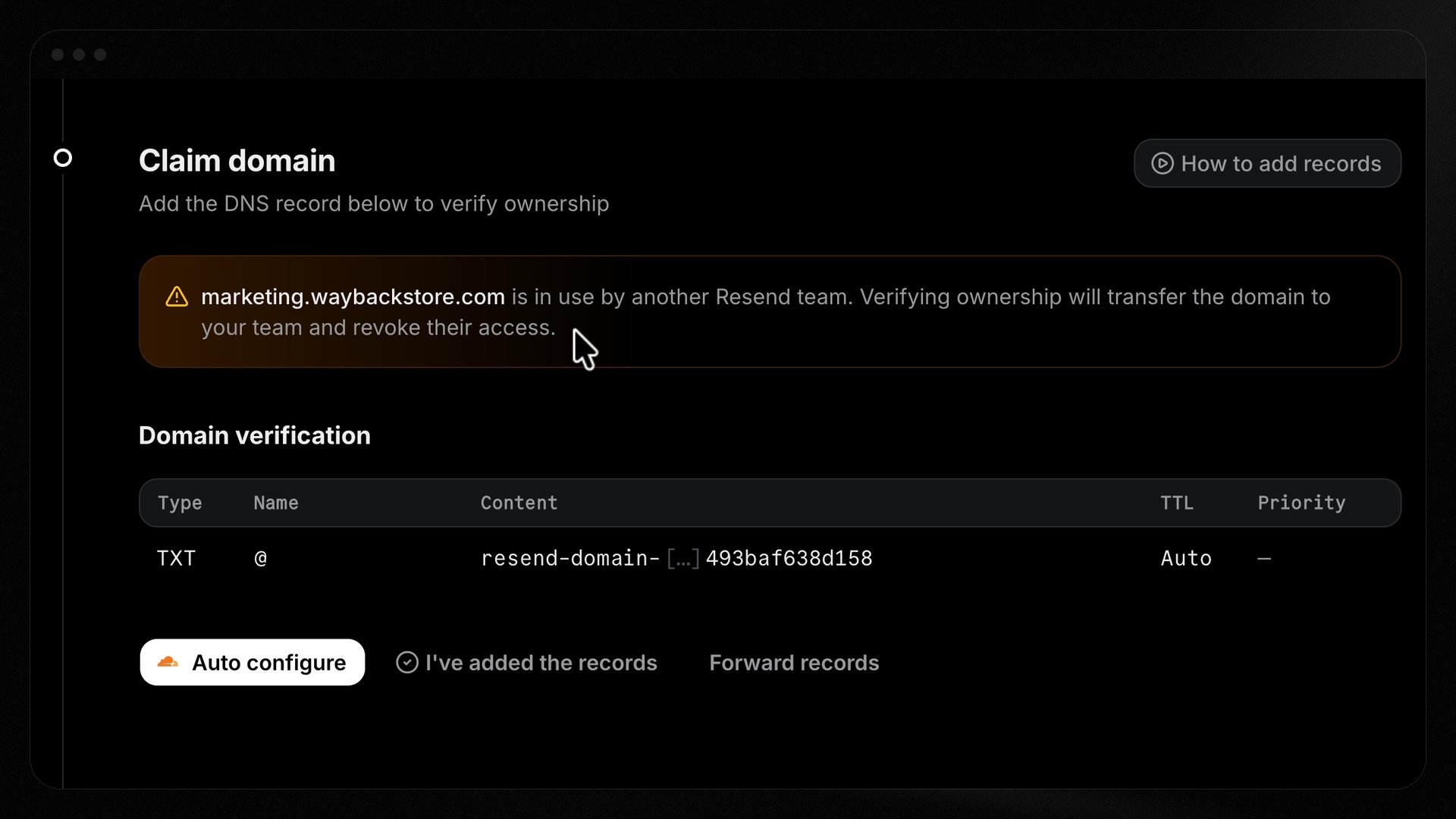 After adding the TXT record, return to the dashboard and click **I've added the records**.
Resend verifies the domain ownership, releases the domain from the previous team, and shows you the records to add to your DNS for sending or receiving. See the full steps to [add a domain](/docs/add-a-domain).
## Using the Domains API
Call [Claim Domain](/docs/api-reference/domains/claim-domain) with the domain
name. Resend creates a placeholder domain on your team and returns a
`domain_claim` containing a TXT `record` to add to your DNS.
Add the returned TXT record at your DNS provider. It proves you control the
domain.
Call [Verify Domain Claim](/docs/api-reference/domains/verify-domain-claim).
Resend checks the TXT record and runs ownership-safety checks before
transferring the domain.
Poll [Get Domain Claim](/docs/api-reference/domains/get-domain-claim) until the
claim reaches `completed`.
## Claim status
| Status | Meaning |
| ------------ | -------------------------------------------------------- |
| `pending` | Waiting for DNS verification. |
| `verified` | DNS proof accepted; the transfer is in progress. |
| `completed` | The domain now belongs to your team. |
| `blocked` | A safety check blocked the claim — see `blocked_reason`. |
| `expired` | The claim window passed before it completed. |
| `superseded` | A newer claim replaced this one. |
| `canceled` | The claim was canceled. |
| `failed` | The claim could not be completed. |
When a claim is `blocked`, `blocked_reason` explains why: `grace_period`,
`recent_owner_activity`, or `pending_scheduled_emails`.
## Canceling a claim
Cancel a pending claim initiated with the API by deleting its placeholder domain with
[Delete Domain](/docs/api-reference/domains/delete-domain), using the `domain_id`
from the `domain_claim` object.
## Support
If you can't locate your domain in another team, and you are unable to successfully claim the domain, contact [Resend support](https://resend.com/help) and share the domain name so the team can help you recover access.
After adding the TXT record, return to the dashboard and click **I've added the records**.
Resend verifies the domain ownership, releases the domain from the previous team, and shows you the records to add to your DNS for sending or receiving. See the full steps to [add a domain](/docs/add-a-domain).
## Using the Domains API
Call [Claim Domain](/docs/api-reference/domains/claim-domain) with the domain
name. Resend creates a placeholder domain on your team and returns a
`domain_claim` containing a TXT `record` to add to your DNS.
Add the returned TXT record at your DNS provider. It proves you control the
domain.
Call [Verify Domain Claim](/docs/api-reference/domains/verify-domain-claim).
Resend checks the TXT record and runs ownership-safety checks before
transferring the domain.
Poll [Get Domain Claim](/docs/api-reference/domains/get-domain-claim) until the
claim reaches `completed`.
## Claim status
| Status | Meaning |
| ------------ | -------------------------------------------------------- |
| `pending` | Waiting for DNS verification. |
| `verified` | DNS proof accepted; the transfer is in progress. |
| `completed` | The domain now belongs to your team. |
| `blocked` | A safety check blocked the claim — see `blocked_reason`. |
| `expired` | The claim window passed before it completed. |
| `superseded` | A newer claim replaced this one. |
| `canceled` | The claim was canceled. |
| `failed` | The claim could not be completed. |
When a claim is `blocked`, `blocked_reason` explains why: `grace_period`,
`recent_owner_activity`, or `pending_scheduled_emails`.
## Canceling a claim
Cancel a pending claim initiated with the API by deleting its placeholder domain with
[Delete Domain](/docs/api-reference/domains/delete-domain), using the `domain_id`
from the `domain_claim` object.
## Support
If you can't locate your domain in another team, and you are unable to successfully claim the domain, contact [Resend support](https://resend.com/help) and share the domain name so the team can help you recover access.